

Moors Sign Up: Registering and Logging In Step by Step
Moors registration online is quick when your details are ready, usually a matter of minutes. This page covers the sign-up itself and the login that comes after, so your first bet is not held up by missing information. Still weighing the brand up? Read the platform overview first. Phone or computer, the process feels much the same, and once the Moors sign up is behind you, coming back later is a short job.
Details to Have Ready
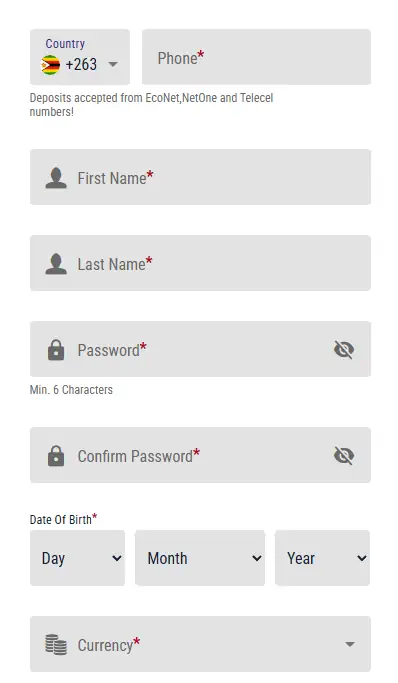
Collect a few basics first. Registration wants your phone number, your first and last name, and a password that you type twice.
The form also expects:
- Date of birth, so your age can be checked
- Your currency of choice: ZWL, US$ or Rand
- National Identification Number
- A promo code, but only if you have one
With everything in front of you, the account can be created without stopping halfway.
Filling in the Form
The “Join” button at the top of the page opens the registration form, and the rest follows in order.
- Type in your phone number, name, password, date of birth, currency and ID number.
- Enter a promo code if one applies to you.
- Go through the terms and conditions, then tick the box to say you have read them and are over 18.
- Press “Register” to send the form.
That is everything. There are no extra verification screens between you and a finished account.
No Username to Invent
Your phone number is also your login ID, so nothing separate needs to be chosen. A few small habits still pay off while you register:
- Enter a number you check regularly, since the account is linked to it.
- Choose a password you can remember yourself but others cannot guess, using both letters and numbers.
- Do not recycle a password from another betting or banking account.
Getting these right now saves you confusion when you sign in later.
After Registering: Getting Into Your Account
Once you submit, the account is created and tied to the phone number you gave. You will not be asked for an email address or an SMS confirmation, because the phone number and password act as your proof of identity.
To sign in, press the “Login” button on the homepage, type the number you registered with and add your password, and you are inside. Trouble on a handset? The mobile login page deals with that in detail.
Forgotten passwords are usually something support channels can reset using the phone number on file, which is a good reason to keep that number active and within reach.
Will You Qualify for a First-Deposit Bonus?
New accounts may qualify for a bonus on a first deposit, though the details vary and should be confirmed on the official site. Registration must be fully completed before any such offer can apply.
Wagering requirements normally come with a bonus, for example playing through a multiple of the bonus amount across a minimum number of tickets within a time window. Deposits and withdrawals are dealt with in a Moor’s World of Sport Betting Shop, and online payments are supported too.
Bonus terms are revised from time to time, so if offers interest you, look at the current promotion conditions before you deposit.